Creating a home office that is both productive and inspiring can make a significant difference in how you approach your workday. Whether you are working remotely full-time or just need a dedicated space for occasional tasks, an organized and motivational environment helps maintain focus and creativity. This guide offers practical tips to help you design a home office that works for you.
Choose the Right Location
The first step in creating an effective home office is selecting the best spot in your home. Ideally, choose a quiet area with minimal distractions. If possible, pick a room with a door to separate your work space from living spaces.
Consider these factors when choosing your location:
– Natural light availability
– Proximity to necessary resources (like a power outlet or printer)
– Size to comfortably fit your furniture and equipment
– Access to ventilation for fresh air circulation
Natural light is especially important because it boosts mood and productivity. If natural light is limited, supplement with quality artificial lighting.
Invest in Comfortable and Functional Furniture
Your furniture impacts both comfort and efficiency. Investing in a good chair and desk designed for prolonged use prevents discomfort and supports better posture.
Desk:
– Choose a desk large enough for your computer, notepad, and other essentials
– Consider height-adjustable desks to switch between sitting and standing
– Ensure there is enough legroom
Chair:
– Opt for an ergonomic chair with adjustable height and lumbar support
– Look for breathable materials to stay comfortable throughout the day
Having furniture that supports your body and workflow reduces fatigue and helps you concentrate.
Organize Your Space to Reduce Clutter
A cluttered desk can make it difficult to focus. Organizing your workspace keeps distractions at bay and simplifies your daily routine.
Tips for organizing:
– Use cable organizers to manage cords and chargers
– Incorporate drawer organizers or desktop trays for small items
– Keep only frequently used items within arm’s reach
– Use shelves or filing cabinets to store documents and supplies
Regularly declutter your space by removing anything irrelevant to your current tasks.
Personalize Your Workspace
Making your home office feel welcoming and inspiring helps sustain motivation. Adding personal touches creates a space you enjoy spending time in.
Ideas to personalize:
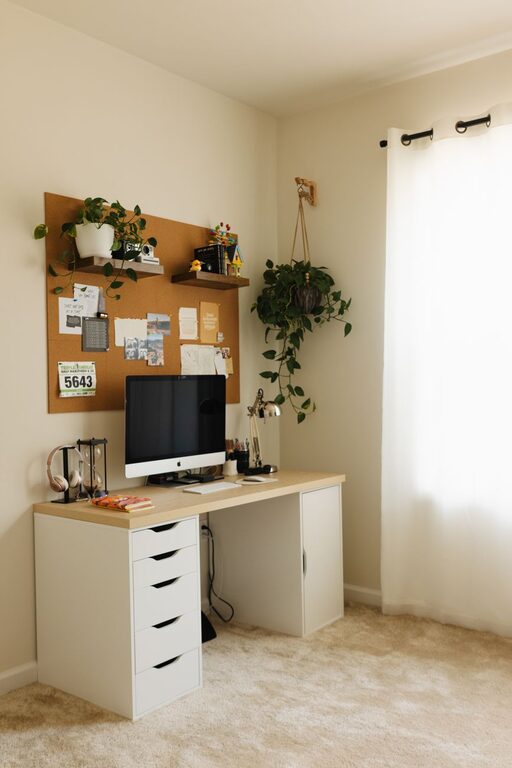
– Add plants to improve air quality and add vibrant greenery
– Hang artwork or photos that inspire you
– Use decorative organizers in colors or styles you like
– Choose a desk mat or mouse pad that reflects your personality
Personal touches make the environment more pleasant while maintaining professionalism.
Optimize Lighting for Productivity
Lighting plays a crucial role in reducing eye strain and maintaining alertness. Natural lighting is best, but having layered lighting options helps in all conditions.
Lighting recommendations:
– Position your desk near a window if possible
– Use LED desk lamps with adjustable brightness and color temperature
– Avoid glare on your computer screen by positioning lights appropriately
– Consider warm light for relaxing late in the day, cooler light for focus
Proper lighting setup enhances your work experience and prevents headaches.
Minimize Distractions
Working from home often comes with distractions that can interrupt your flow. Creating boundaries and minimizing interruptions is essential.
Strategies to minimize distractions:
– Set clear work hours and communicate them to family or housemates
– Use noise-cancelling headphones or background white noise if needed
– Turn off non-essential notifications on devices during work periods
– Create a routine that signals the start and end of the workday
Establishing these habits fosters discipline and improves concentration.
Incorporate Technology Wisely
Technology powers your home office, but too many gadgets can become overwhelming. Choose technology that enhances your workflow without cluttering your space.
Technology tips:
– Use wireless devices to cut down on cable clutter
– Invest in a high-quality webcam and microphone for video meetings
– Utilize cloud storage solutions for easy access to files
– Consider a second monitor for increased screen space
Regularly update software and maintain your devices to avoid technical disruptions.
Take Breaks and Refresh Your Space
Finally, remember that your home office should support healthy work habits. Taking regular breaks helps prevent burnout and maintains creativity.
Break tips:
– Use a timer or app to remind you to stand or stretch every hour
– Step outside or move to a different room to recharge
– Keep a water bottle nearby to stay hydrated
Refreshing your workspace occasionally—like rearranging furniture or changing décor—can also reinvigorate your enthusiasm.
—
Designing a productive and inspiring home office is achievable with thoughtful planning and simple changes. By focusing on comfort, organization, lighting, and personalization, you can create a space that supports your best work every day. Take time to adjust your environment as your needs evolve and enjoy the benefits of a home office made just for you.
About the Author